Lockout/Tagout Permissions Concept
A safety-themed approach to user permissions that every tradesperson understands
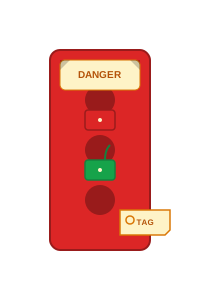
LOTO Hasp Device
Custom SVG asset for permissions UI
How It Works
Familiar safety concepts applied to digital permissions
Red Locked
Safety-critical restriction (cannot post jobs, cannot message)
Yellow Locked
Warning / limited access (pending verification)
Green Unlocked
Full access granted (verified crew member)
Lock Tags
Shows who controls each permission (admin, user, system)
Mock Permissions Interface
How this could look on a user's settings page
Post Jobs
Create and manage job postings
Direct Messaging
Send messages to other crew members
⚠️ Account verification required
Profile Visibility
Show your profile to other crew members
⚠️ Limited - complete your profile to unlock
Browse Jobs
View and respond to job postings
Safety First
Just like on a jobsite, some actions require additional verification to keep everyone safe. Complete your profile verification to unlock full crew member access.
Why This Metaphor Works
Universal Training
Every tradesperson knows LOTO from OSHA training
Safety Culture
Reinforces our commitment to responsible practices
Visual Clarity
Color-coded locks provide instant status understanding